Notifications
Stay informed with real-time updates on insight activity and collaboration across your workspace.
Overview
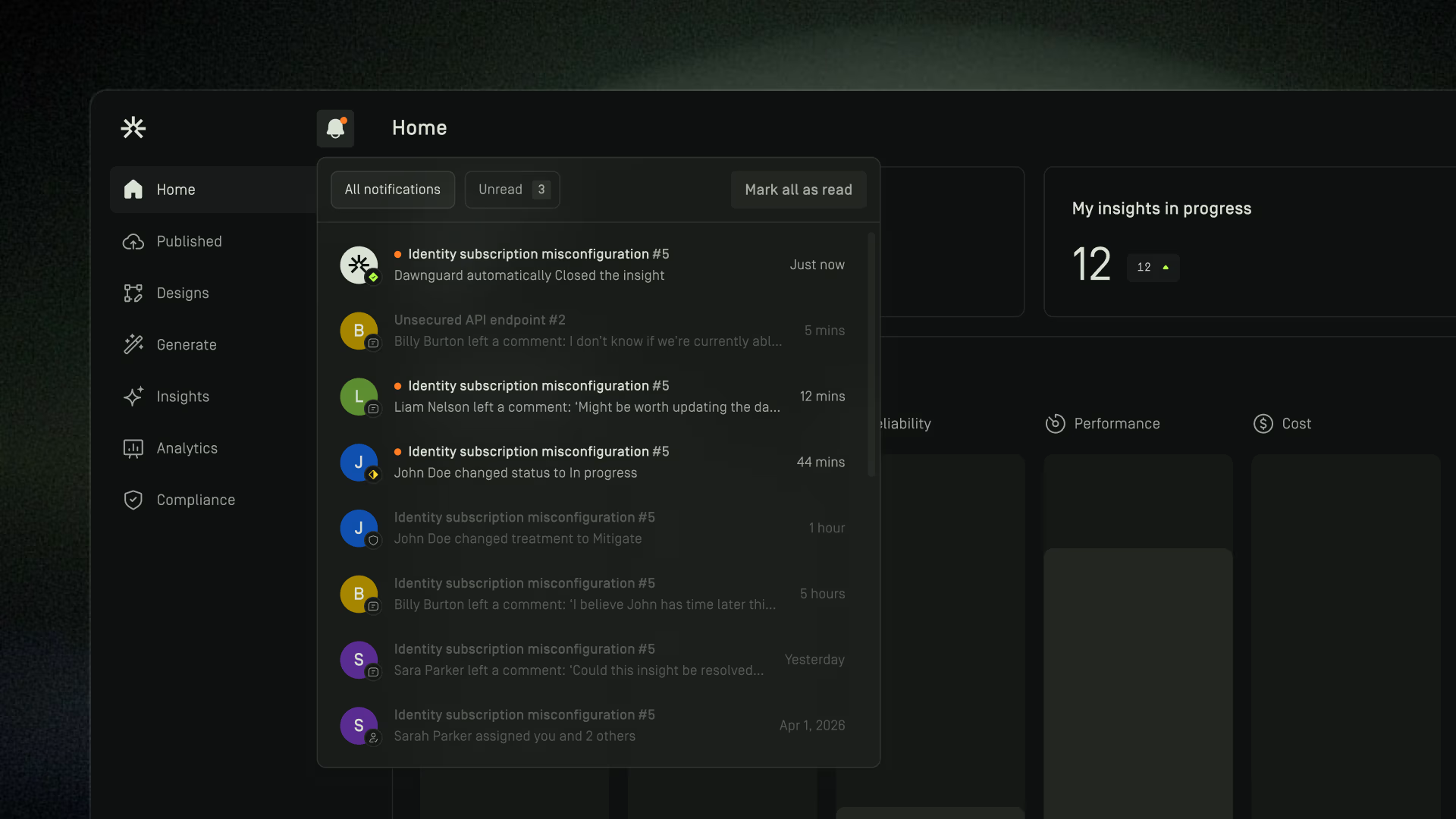
The Notifications panel provides a centralized view of recent activity relevant to your work in Dawnguard.
You can access notifications by clicking the bell icon in the top navigation bar.
Notifications help you stay informed about updates to insights, assignments, comments, and other workspace activity without having to manually monitor changes.
All Notifications
The All Notifications tab displays all notifications available to your account, including both read and unread notifications.
Use this view to review recent activity across your workspace and track changes that may require your attention.

Mark All as Read
Use Mark all as read to mark all current notifications as read.
Once marked as read, these notifications will no longer appear under the Unread tab but will remain available under All Notifications.
Notification Activity
Notifications may be generated for activities such as:
- Insight assignments and unassignments
- Insight treatment changes
- Insight status changes
- New comments on insights
- Other workspace activity
Notifications are personalized and are intended to keep you informed about items that are relevant to you and your work.
Notification Preferences
You can control which notifications you receive and how they are delivered.
Notification preferences allow you to configure:
- In-app notifications
- Email notifications
- Insight workflow notifications
- Insight report notifications
For information on managing notification preferences, see the Settings article.